Recovering from SERIAL NUMBER MISSING error
When upgrading to firmware version 1.7.6, some users experienced an error message on the Yeti display that reads SERIAL NUMBER MISSING. When the Yeti is in this state, it is unable to correctly identify its hardware and prevents the unit from discharging (via output ports) and charging (via input ports).
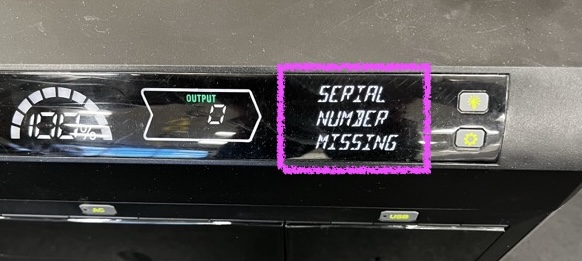
To help customers recover from this error, we developed a beta-only mobile app that is able to recover the Yeti Serial Number as well as install firmware updates.
Important
This app is only available to customers who have joined the Yeti Recovery Tools App Beta program.
Once you have joined the beta program and installed the app, you can follow these steps to recover the Yeti Serial Number:
- Press the POWER SWITCH button to turn the Yeti off.
- Wait 60 seconds.
- Press the POWER SWITCH button to turn the Yeti on.
- Press and hold the PAIR button for 3 seconds.
- Ensure that the Yeti's Bluetooth icon is blinking on the Yeti display.
- Open the Yeti Recovery Tools app and SCAN FOR DEVICES.
- Select the Yeti PRO 4000 from the list of devices.
- Once the Yeti is connected, the app will display Yeti information and show the state of the Yeti's serial number validity.
- If the serial number is missing, the app will offer a RECOVER SERIAL NUMBER button.
- Press the RECOVER SERIAL NUMBER button.
- The app will check our registry to validate the device's serial number.
- If a serial number is not found, the user will be asked to submit a Serial Number recovery request form.
- Within 48 hours, Goal Zero will review the request and add the serial number to the device's registry if the serial number request is approved.
- Once the serial number is added to the device's registry, the user will be able to use the Yeti Recovery Tools app again to recover the serial number.
- If the serial number is found, the app will display the serial number and the user will be able to proceed with recovering the serial number to the device.
- The Yeti will reset and the serial number will be recovered.
- The Recovery Tools app will be disconnected from the Yeti.
- It's recommended that the user reconnects the Yeti to the Recovery Tools app to install the latest firmware update.